VTube - How to Deactivate a Cloud Internet License
To use the same VTube license on a different computer, the first activation must be deactivated. The software can only be active on one computer at a time.
These steps require that all computers used have an Internet connection.
Before moving your VTube to another computer, consider creating a backup of the current VTube configuration to transfer the setup to the other computer.
STEPS |
Action |
Example |
STEP 1 |
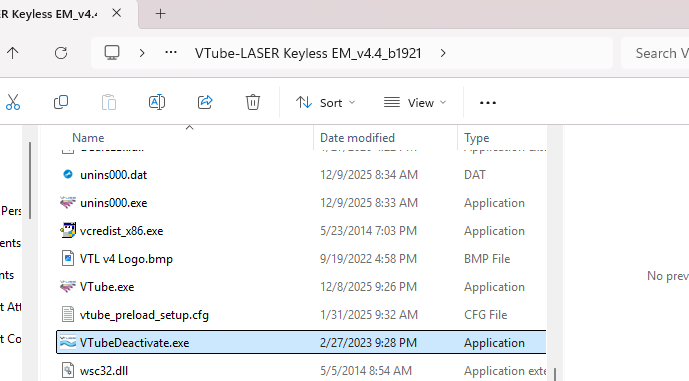
Go to the File Explorer and navigate to C:\Program Files (x86)\VTube-_______ License_v___4.4_b___ |
|
STEP 2 |
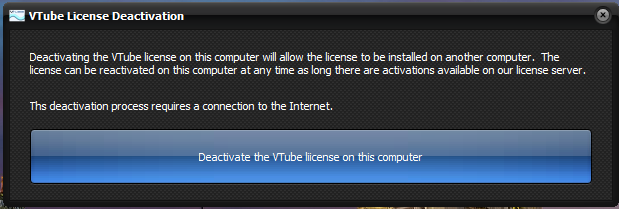
Run the VTubeDeactivate.exe and press "Deactivate the VTube license on this computer." |
|
STEP 3 |
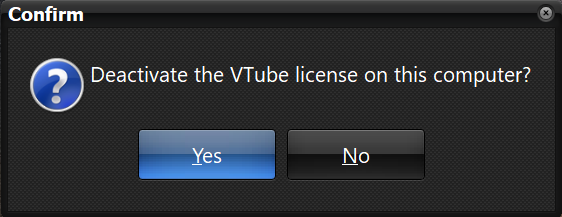
Press Yes to confirm. |
|
STEP 4 |
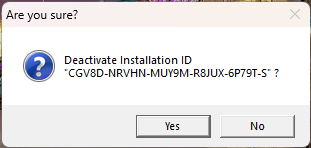
Press Yes to confirm. |
|
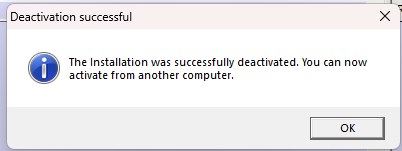
STEP 5 |
Press OK. |
|
STEP 6 |
Deactivation Successful! |
This license can now be used on a new computer. |